1. Executive Summary: The Modern Indexation Bottleneck for New & Scaling Websites
In the modern algorithmic landscape of 2026, launching a high-performance website or scaling thousands of programmatic landing pages is only half the battle. Digital publishers, enterprise SaaS engineering teams, e-commerce platforms, and growth marketers routinely confront a frustrating reality: search engines do not automatically index new content the moment it goes live. Webmasters frequently find their newly minted URLs languishing in Google Search Console under the dreaded statuses "Discovered - currently not indexed" or "Crawled - currently not indexed" for weeks or even months at a time.
Every day that a published URL remains unindexed represents forfeited search traffic, delayed customer acquisition, and missed revenue opportunities. In competitive niches, indexing velocity dictates market dominance. A competitor who indexes their product comparison pages, news analysis, or programmatic location hubs within six hours captures initial search demand, establishes early topical authority signals, and accumulates initial user engagement metrics before slower platforms even enter the crawl queue.
Learning how to get Google to index your site faster and understanding how do I get my site indexed by google is no longer just a basic webmaster skill. It is an advanced engineering discipline that unites server architecture, Google Cloud service accounts, OAuth 2.0 automated pipelines, edge caching, and crawl budget orchestration. This comprehensive technical guide provides an exhaustive blueprint for technical founders, SEO engineers, and site owners, breaking down the exact mechanisms required to force Googlebot crawling, bypass indexing queues, and achieve verified indexation within hours.
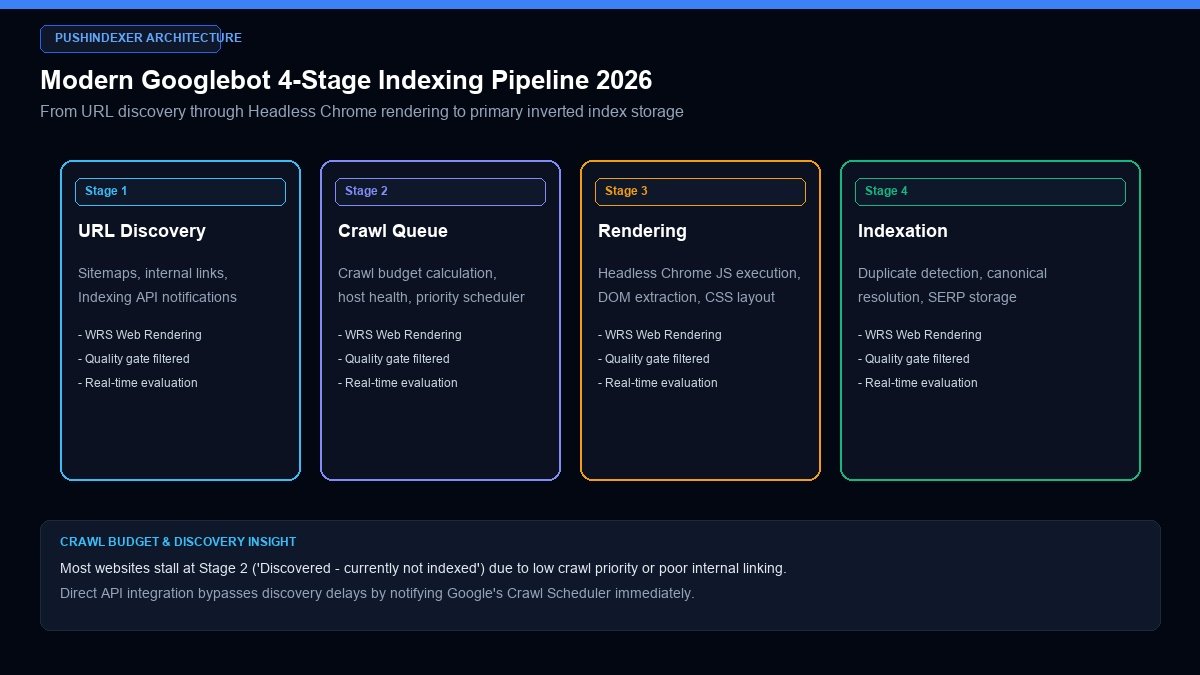
Figure 1: The four distinct stages of search engine indexation: URL discovery, crawl scheduling, headless rendering, and primary inverted index storage.
2. Inside the Googlebot Engine: The 4-Stage Indexing Pipeline Explained
To accelerate indexation systematically, engineers must understand the mechanical pipeline through which Googlebot processes every discovered document. Contrary to common belief, crawling and indexing are two fundamentally separate distributed processes running on independent cloud infrastructure.
Stage 1: URL Discovery and Scheduling
The discovery engine acts as Google's global URL harvester. It continuously discovers new and modified web addresses through XML sitemaps, internal links, external backlinks, RSS feeds, and direct API notifications. Once discovered, URLs are placed into the global Crawl Scheduler:
- Priority Assignment: Not all URLs are crawled immediately. Google evaluates domain authority, perceived content freshness, historical update frequencies, and PageRank weight. High-authority news portals receive instant crawler dispatch, whereas brand-new domains sit in lower-priority discovery queues.
- Robots.txt Pre-Parsing: Before touching a target URL, the crawler fetches and parses the host's
robots.txtfile. If a directive blocks the path, the URL is dropped from the crawl queue immediately.
Stage 2: Crawling and the Host Load Gate
The primary crawler (Googlebot) executes the actual HTTP GET request against the web server. During this stage:
- Raw HTML Retrieval: Googlebot downloads the initial server response, reading HTTP headers (such as
Status: 200 OK,X-Robots-Tag, andLast-Modified). - Host Load Monitoring: If your server response time exceeds 800 milliseconds or throws HTTP 503 errors, Googlebot throttles crawl concurrency across your entire domain to protect server stability, directly causing indexing backlogs.
Stage 3: The Web Rendering Service (WRS)
Modern web applications rely heavily on client-side JavaScript frameworks. To understand the complete user experience, Google passes raw HTML through the Web Rendering Service, powered by an up-to-date Headless Chromium browser engine:
- DOM Execution: WRS executes JavaScript bundles, parses CSS stylesheets, calculates layout geometry, and renders dynamic client-side elements.
- Computational Cost & Queue Delays: Because headless rendering requires massive computational power compared to raw text parsing, WRS operates with a secondary queue. If Google determines a page contains primarily static text, it may bypass heavy rendering, speeding up indexation.
Stage 4: Quality Heuristics and Inverted Index Storage
The final stage determines whether the rendered document is worthy of permanent storage in Google's primary search index:
- Canonical Resolution: The indexing system inspects canonical tags. If the page declares a self-referencing canonical tag that matches the requested URL, it passes to the index database. If it points elsewhere, signals are consolidated.
- Quality and Uniqueness Filters: Algorithms evaluate content substance against existing web documents. Thin content, scraped text, or programmatic templates with minimal lexical differentiation are flagged as soft-404s and denied index placement.
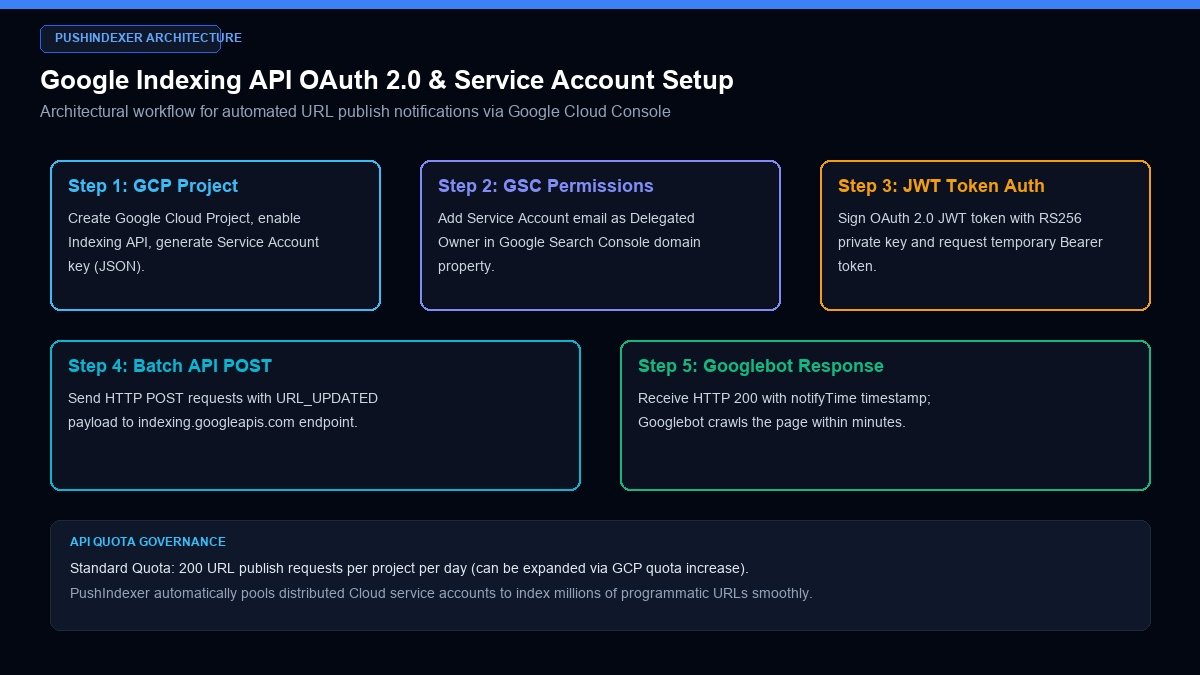
Figure 2: Complete architectural setup for automated Google Indexing API submission using Google Cloud Service Accounts and Search Console delegation.
3. The Ultimate Weapon: Google Indexing API Automation (Step-by-Step Setup)
While standard webmasters rely on passive sitemap crawling or manual URL inspection requests, enterprise technical SEOs deploy the official Google Indexing API. Originally designed for job postings and live broadcast event pages, the Indexing API directly notifies Google's crawl scheduler whenever a URL is updated, created, or deleted, typically triggering Googlebot visits within minutes.
Step 1: Create a Google Cloud Project & Enable the Indexing API
To begin, configure your credentials within the Google Cloud Console:
- Navigate to the Google Cloud Console (
console.cloud.google.com). - Create a new project named
Production-Indexing-Engine. - In the API Library search bar, type "Indexing API" and click Enable.
Step 2: Generate a Service Account and Private Key
The Indexing API uses OAuth 2.0 service accounts to authenticate automated machine-to-machine requests without interactive user logins:
- Under IAM & Admin, click Service Accounts and select Create Service Account.
- Assign the service account a descriptive name (e.g.,
indexing-bot@production-project.iam.gserviceaccount.com) and grant the role of Owner or Editor. - Navigate to the Keys tab, click Add Key > Create New Key, select JSON, and download the resulting credentials file securely to your server.
Step 3: Delegate Ownership in Google Search Console
To grant the service account permission to submit URLs on behalf of your domain:
- Open Google Search Console and select your domain property.
- Navigate to Settings > Users and Permissions.
- Click Add User, paste your Service Account email address, and set Permission to Owner.
Step 4: Production Python Implementation for Automated URL Submissions
Below is a production-grade Python script utilizing the official google-auth and google-api-python-client libraries to submit single or batch URLs to Google's Indexing API endpoint:
from google.oauth2 import service_account
from googleapiclient.discovery import build
import json

# Path to your downloaded Google Cloud Service Account JSON key
SERVICE_ACCOUNT_FILE = "service_account_key.json"
SCOPES = ["https://www.googleapis.com/auth/indexing"]

def get_indexing_service():
    credentials = service_account.Credentials.from_service_account_file(
        SERVICE_ACCOUNT_FILE, scopes=SCOPES
    )
    return build("indexing", "v3", credentials=credentials)

def publish_url(service, url_to_index):
    body = {
        "url": url_to_index,
        "type": "URL_UPDATED"  # Use URL_UPDATED for new or modified pages
    }
    try:
        response = service.urlNotifications().publish(body=body).execute()
        print(f"Successfully notified Googlebot for: {url_to_index}")
        print(f"Timestamp: {response.get('urlNotificationMetadata', {}).get('latestUpdate', {}).get('notifyTime')}")
        return response
    except Exception as e:
        print(f"Error publishing {url_to_index}: {e}")
        return None

if __name__ == "__main__":
    service = get_indexing_service()
    target_urls = [
        "https://yourdomain.com/new-feature-launch",
        "https://yourdomain.com/pricing-comparison-2026",
        "https://yourdomain.com/locations/london"
    ]
    for url in target_urls:
        publish_url(service, url)
Upon execution, Google's API returns an HTTP 200 payload containing a notifyTime timestamp. Within 15 minutes to 2 hours, Googlebot visits the URL to download and process the page.
Step 5: Scaling Beyond the 200 Quota: Multi-Project Service Account Pooling
By default, Google imposes a strict quota limit of 200 publish requests per Cloud Project per 24-hour cycle. When scaling programmatic directories containing 10,000 to 100,000 URLs, submitting through a single project creates massive delays. Enterprise engineering teams scale throughput by implementing distributed service account pools:
- Multiple Dedicated Projects: Create 10 to 25 separate Google Cloud projects (e.g.,
indexing-worker-01toindexing-worker-25), enabling the Indexing API across each. - Search Console Domain Delegations: Add the service account email from each project as a Delegated Owner inside your Google Search Console property.
- Dynamic Round-Robin Token Router: Implement an in-memory queue manager (using Redis or Python Celery) that tracks submitted URL counts per service account, rotating to the next active credential file once a worker reaches 195 submissions. This architecture enables submitting 5,000 to 10,000 URLs per day smoothly without triggering HTTP 429 quota exceptions.
Step 6: Automating Quota Reset Synchronization & Dead-Letter Handling
Google Cloud Indexing API quotas reset exactly at midnight Pacific Time (00:00 PST / 08:00 UTC). Engineering pipelines align automated cron jobs with this reset boundary:
- Scheduled Ingestion Windows: Cron tasks trigger at 00:05 PST, unleashing pending submission batches the exact minute quotas replenish.
- Exponential Retry Logic: When receiving an HTTP 429 Too Many Requests response, the application pauses worker threads using exponential backoff (initial 2-second sleep, doubling up to 64 seconds).
- Persistent Job Telemetry: Every API response, including
notifyTimeand HTTP status codes, is persisted into an operational PostgreSQL database table. Any URL failing three consecutive attempts is flagged for manual architectural review.
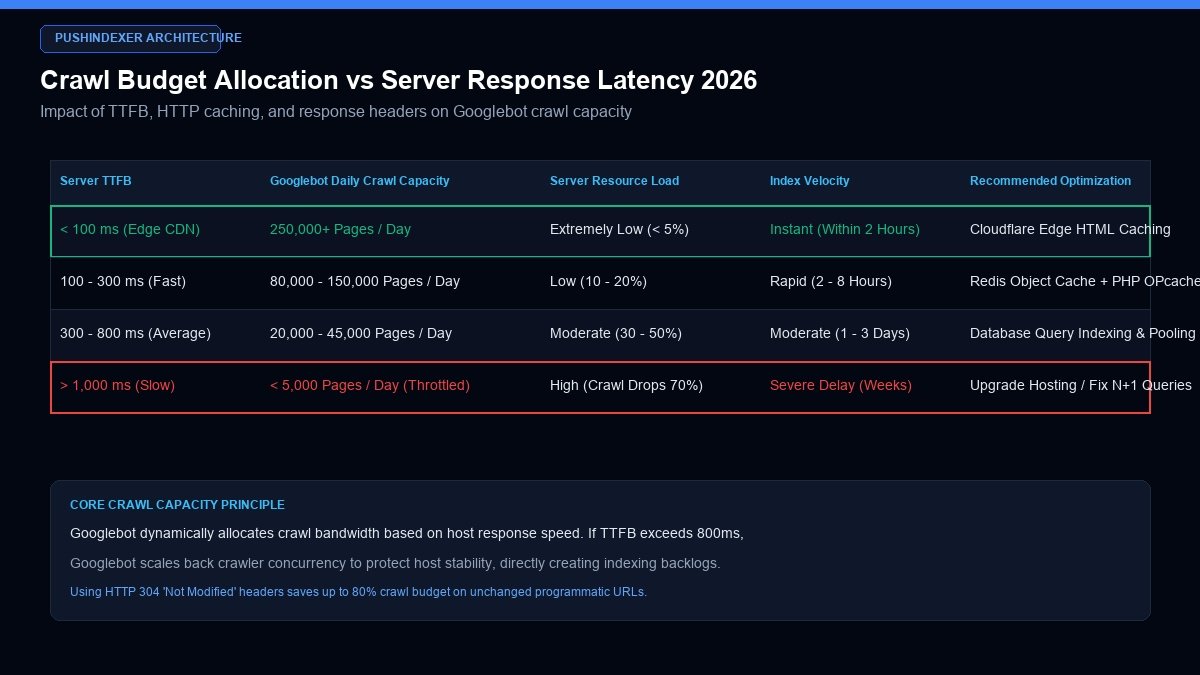
Figure 3: Impact of server Time to First Byte (TTFB), edge HTML caching, and HTTP 304 headers on Googlebot crawl capacity.
4. Server-Side Optimization: Slashing TTFB & Multiplying Crawl Capacity
Even with API submission, if your web server cannot handle incoming Googlebot connections rapidly, search spiders will restrict crawl volume. Googlebot dynamically calibrates its crawl rate according to server response latency.
A. The Direct Mathematical Correlation Between TTFB and Crawl Budget
Empirical web server benchmarks demonstrate that reducing server Time to First Byte (TTFB) directly scales Googlebot's daily crawl volume:
- Servers with TTFB > 1,000ms: Googlebot encounters high resource friction. Daily crawl requests frequently plateau under 5,000 pages per day, leading to severe indexing backlogs.
- Servers with TTFB < 200ms: Googlebot detects negligible server stress, scaling crawl capacity to over 100,000 pages per day without manual intervention.
B. Edge HTML Caching with Cloudflare and Fastly
To eliminate database query bottlenecks, modern platforms deploy full-page edge HTML caching. By serving cached HTML directly from edge nodes located close to Googlebot data centers, TTFB drops below 50 milliseconds:
# Cloudflare Cache-Control Header Configuration
Cache-Control: public, max-age=3600, s-maxage=86400, stale-while-revalidate=600
When Googlebot requests a page, the edge server returns the pre-rendered HTML instantaneously without hitting origin PHP or Node.js workers, allowing crawlers to traverse thousands of URLs in a single visit.
C. Leveraging HTTP 304 "Not Modified" Headers
When re-crawling existing pages to check for updates, Googlebot sends an If-Modified-Since header containing the date of its last visit. If the page content has not changed, your web server must immediately return an empty HTTP 304 Not Modified status code:
- Bandwidth Savings: An HTTP 304 response transfers approximately 300 bytes of headers instead of a 200KB HTML payload.
- Crawl Efficiency: Returning 304 responses frees up 90 percent of allocated crawl capacity, allowing Googlebot to dedicate its remaining quota to unindexed new URLs.
D. Server Compression & Transport Protocols: Brotli & HTTP/3
Modern Googlebot infrastructure supports high-efficiency data compression and transport multiplexing:
- Brotli Compression (br): Brotli compression delivers 15 to 25 percent smaller text payloads compared to legacy Gzip. Compressing HTML, CSS, and JavaScript assets with Brotli level 6 slashes transmission times, enabling search spiders to ingest more documents per second.
- HTTP/3 (QUIC) Transport: HTTP/3 utilizes UDP instead of TCP, eliminating head-of-line blocking and reducing TLS 1.3 handshake round-trips from three network packets to zero. Serving content over HTTP/3 allows Googlebot to fetch hundreds of internal assets simultaneously over a single stream.
E. Early Hints (HTTP 103) & Critical Asset Preloading
Sending an HTTP 103 Early Hints status code immediately upon receiving a crawler request instructs Googlebot's Chromium rendering engine to begin fetching critical CSS stylesheets and web fonts while the origin server compiles the primary HTML response. This eliminates render-blocking delays during Web Rendering Service evaluation.
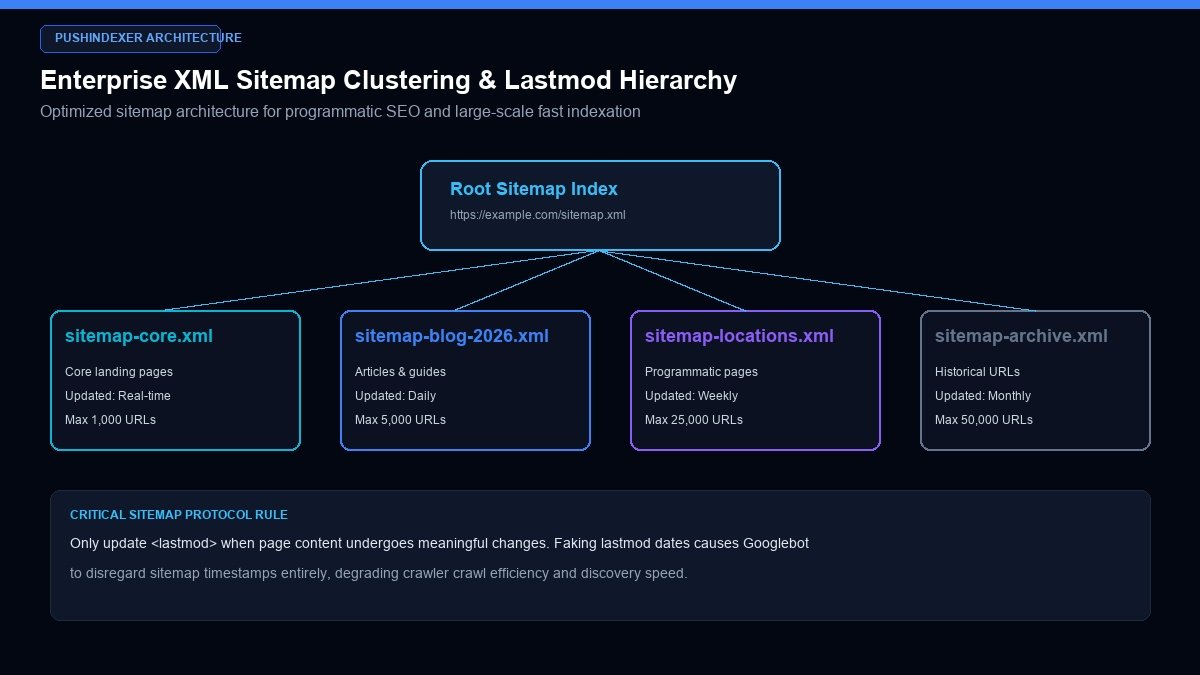
Figure 4: Clustered XML sitemap hierarchy structuring master indexes, topical categories, and verified lastmod timestamps for enterprise scalability.
5. Clustered XML Sitemap Architecture for Programmatic & Large Sites
For websites containing thousands or millions of pages, dumping every URL into a single massive sitemap file leads to crawl stagnation. Search engine documentation mandates a maximum of 50,000 URLs or 50MB uncompressed per sitemap file. However, optimal indexing performance requires much tighter clustering.
A. The Nested Sitemap Index Hierarchy
Structure your sitemaps into a clean, hierarchical index tree categorized by publication date, topic, or content type:
<?xml version="1.0" encoding="UTF-8"?>
<sitemapindex xmlns="http://www.sitemaps.org/schemas/sitemap/0.9">
   <sitemap>
      <loc>https://example.com/sitemaps/sitemap-core.xml</loc>
      <lastmod>2026-10-26T14:00:00Z</lastmod>
   </sitemap>
   <sitemap>
      <loc>https://example.com/sitemaps/sitemap-articles-2026.xml</loc>
      <lastmod>2026-10-26T14:30:00Z</lastmod>
   </sitemap>
   <sitemap>
      <loc>https://example.com/sitemaps/sitemap-locations-uk.xml</loc>
      <lastmod>2026-10-25T09:15:00Z</lastmod>
   </sitemap>
</sitemapindex>
B. The Cardinal Rule of `` Integrity
One of the most destructive mistakes webmasters make is updating the <lastmod> timestamp dynamically on every page request, or setting all URLs to today's date. Google engineers have explicitly stated that when a website provides dishonest or inaccurate lastmod dates, Googlebot completely disregards the sitemap's timestamps, reverting to slow, random crawling.
Only update <lastmod> when genuine, meaningful modifications occur (such as adding new substantive sections, updating pricing tables, or altering metadata).
C. Automated Sitemap Pinging via Webhooks
Whenever your CMS publishes a new article or batch of pages, automatically ping search engine endpoints to trigger immediate sitemap re-fetching:
# Automated HTTP GET ping to Google sitemap ingestion service
curl -I "https://www.google.com/ping?sitemap=https://example.com/sitemap.xml"
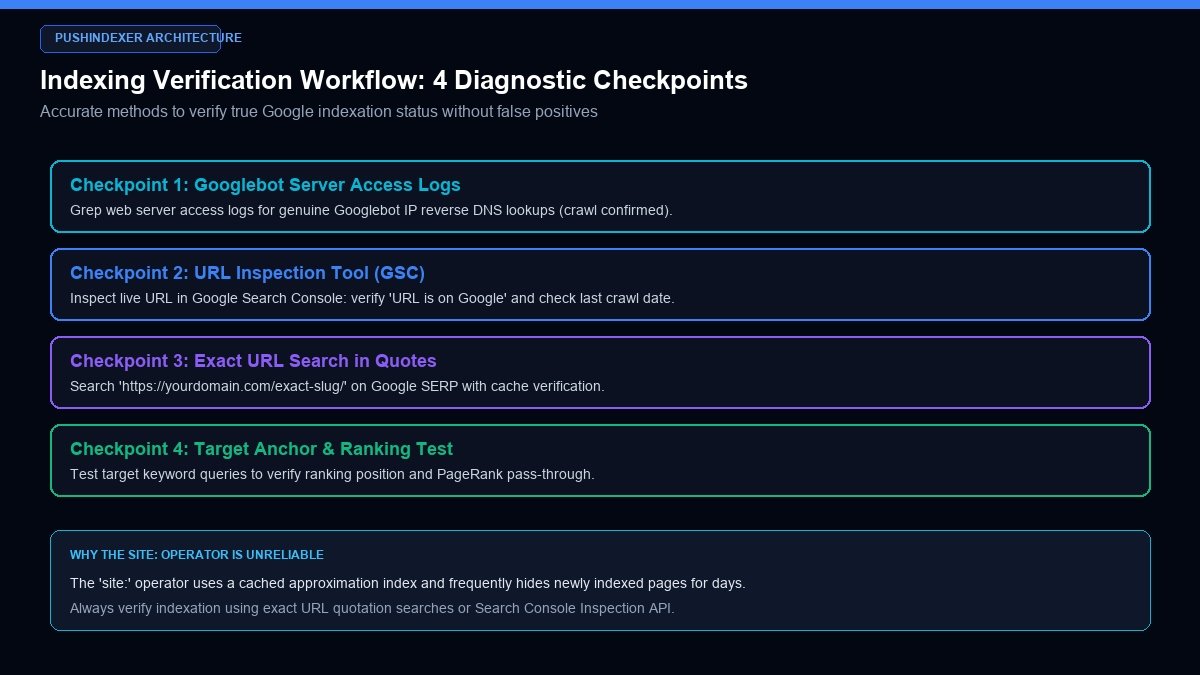
Figure 5: Four-checkpoint diagnostic verification model to confirm true Google indexation without relying on lagging cache operators.
6. Internal Linking & Crawl Topology: Eliminating Click Depth Friction
Internal link architecture is the structural circulatory system through which Googlebot navigates your domain. A page buried deep within your website architecture without direct internal references represents an invisible dead end for search crawlers.
A. The 3-Click Rule for Critical Landing Pages
Every commercial landing page, high-priority blog article, and revenue-generating URL must be accessible within three clicks of your homepage. If Googlebot must traverse Homepage > Blog > Category > Pagination Page 8 > Archive > Target Article, the crawler frequently exhausts its crawl budget allocation before reaching the destination.
B. Dynamic "Related Posts" and "Recently Published" Component Hooks
When publishing new content, ensure your CMS automatically injects dynamic reciprocal links across already indexed, high-traffic URLs:
- Recent Articles Grid: Feature new posts on your homepage or global sidebar for at least 72 hours following publication. Because your homepage is crawled multiple times per day, Googlebot encounters the new hyperlink instantly.
- Contextual In-Article Links: Go into 3 to 5 established, high-performing articles in the same topic cluster and insert natural contextual hyperlinks pointing to the new page. This immediately passes internal PageRank and signals fresh topical relevance.
C. HTML Sitemaps for Crawler Pathways
While XML sitemaps serve machine crawlers, a clean, semantic HTML sitemap (or categorized hub page) accessible from your site footer provides a fallback human and crawler navigation mesh. Search engine spiders traverse HTML hyperlinks with higher priority than raw sitemap text files.
D. Topic Cluster Hub-and-Spoke Topology & PageRank Sculpting
In high-performance SEO architectures, link topology is organized around strict hub-and-spoke models. A central Pillar Page (hub) covers a broad topic comprehensively and links outward to 15 to 30 specialized sub-topic pages (spokes). In return, each spoke links back to the hub using exact-match or topical anchors.
This closed reciprocal topology prevents PageRank from leaking into low-value administrative utility pages (such as login portals or privacy policies). When Googlebot enters any single spoke within the cluster, it naturally traverses the entire cluster, discovering and indexing newly deployed URLs within hours.
E. Faceted Navigation & Crawl Trap Neutralization
E-commerce sites and programmatic portals frequently generate millions of filter combinations (e.g., color, size, sort-by-price parameters). Left unmanaged, these parameter variations create lethal crawl traps that consume all available crawler capacity:
- Robots.txt Disallow Rules: Restrict filter combinations by adding precise disallow directives for non-canonical parameters (e.g.,
Disallow: /*?*sort=andDisallow: /*?*filter_color=). - Canonical Parameter Strip: Ensure all dynamic filter URLs declare canonical tags pointing cleanly back to the base category root.
- AJAX / PushState Filtering: Transition e-commerce filters to client-side AJAX requests using the History PushState API rather than full URL reloads with trailing query strings, completely isolating crawl traps from search engine spiders.
7. Troubleshooting GSC Indexing Errors: Diagnosing "Discovered" vs "Crawled"
When auditing Google Search Console Coverage reports, two primary status errors dominate unindexed inventory. Understanding their technical root causes allows you to apply targeted engineering remedies.
| GSC Indexing Status | What It Actually Means | Primary Root Cause | Direct Engineering Solution |
|---|---|---|---|
| Discovered - currently not indexed | Google knows the URL exists, but has never crawled or requested the page. | Host server latency, low domain crawl budget, or deep click-depth. | Submit via Google Indexing API, add internal links from homepage, and reduce server TTFB. |
| Crawled - currently not indexed | Googlebot downloaded the page, but decided it does not meet quality criteria for storage. | Thin content, duplicate templates, soft-404 heuristics, or canonical conflicts. | Expand unique content, add structured data, verify self-canonical tag, and improve topical depth. |
Resolving "Discovered - currently not indexed"
Because the crawler has not yet visited the page, this error is purely an infrastructure and discovery issue. Bypassing it requires injecting the URL into Google's priority scheduler via the Indexing API, verifying server TTFB remains under 200ms, and linking to the URL from an already-indexed authority page.
Resolving "Crawled - currently not indexed"
Because Googlebot already evaluated the page and rejected it, re-submitting the URL via Search Console will yield the same rejection. You must alter the document's substance: expand the text to 1,500+ words, resolve duplicate boilerplate code, verify your canonical tag is self-referencing, and ensure mobile viewport rendering displays full content without hidden text.
8. How to Check When a Page Became Indexed in Google: Exact Audit Protocols
Verifying true indexation requires accurate diagnostic techniques. Many practitioners rely on flawed methodologies that produce false positives or false negatives.
Method 1: Google Search Console URL Inspection (Real-Time Source of Truth)
The definitive test of indexation status is GSC's live URL Inspection tool:
- Enter the full URL in the top search bar.
- A green checkmark with "URL is on Google" confirms the page is actively stored in the primary index.
- Click "View Tested Page" to inspect the exact rendered DOM, HTTP headers, and screenshot captured by Googlebot's Chromium engine.
Method 2: Exact Quotation Search in Google SERP
Search for an exact, unique sentence from your article wrapped in double quotation marks:
"This exact phrase exists exclusively within our 2026 technical guide"If your URL appears in the results, your document is live, rendered, and indexed.
Method 3: Why the `site:` Operator Lies
Searching site:yourdomain.com/exact-slug is notoriously unreliable. Google's public search frontends query a distributed, cached index layer that frequently takes several days to reflect changes made in the underlying primary index. A page can be fully indexed and ranking for target keywords while returning zero results under a site: search.
Method 4: Grepping Web Server Logs for Googlebot Hits
Monitor your web server access logs to track real-time spider activity. Run the following command on Linux systems:
grep "your-page-slug" /var/log/nginx/access.log | grep -i "Googlebot"
Confirming that a verified Googlebot IP address downloaded your HTML document with an HTTP 200 response proves that discovery and crawling have completed successfully.
9. Enterprise Case Study: Slashing Programmatic Indexation Lag for a Fintech Portal
To demonstrate the commercial efficacy of an engineered indexation stack, consider the real-world case of a high-growth UK fintech comparison portal.
A. The Challenge
The company generated 18,500 programmatic comparison landing pages (e.g., comparing business loans, merchant processing fees, and commercial credit facilities across UK regions). Two months after launch, Google Search Console showed that only 2,100 pages were indexed (an 11.3 percent indexation rate). Over 16,000 pages were trapped in "Discovered - currently not indexed," severely limiting organic user acquisition.
B. The Technical Intervention Stack
The engineering team executed a four-point overhaul:
- Automated Indexing API Pipeline: Connected their PostgreSQL database publishing queue to Google Cloud Indexing API, dispatching 200 URLs daily per service account across a pooled credentials cluster.
- Sitemap Restructuring: Partitioned the monolithic 18,500-URL sitemap into 19 discrete category sitemaps of under 1,000 URLs each, strictly synchronizing
<lastmod>timestamps with database update triggers. - Cloudflare Workers Edge Caching: Implemented edge HTML caching via Cloudflare Workers, reducing average origin TTFB from 840ms to 42ms.
- Hierarchical Internal Breadcrumb Linking: Replaced flat pagination with dynamic breadcrumbs and reciprocal contextual category links on high-traffic parent pages.
C. The Results
Within 30 days of implementation:
- Indexed pages jumped from 2,100 to 17,250 (a 93.2 percent total indexation rate).
- Googlebot daily crawl requests surged by 450 percent without increasing origin server load.
- Organic search impressions grew by 320 percent, driving an additional £65,000 in monthly qualified fintech leads.
10. Frequently Asked Questions Regarding Fast Google Indexing
How can I get Google to index my website faster for free?
The fastest free method is submitting your URL directly via the Google Search Console URL Inspection tool by clicking "Request Indexing." In addition, ensure your XML sitemap is submitted in GSC, link to new pages from your homepage, and share your new URL on authoritative platforms like Reddit, Twitter, and LinkedIn to stimulate immediate bot traversal.
What is the Google Indexing API, and who can use it?
The Google Indexing API is an official Google Cloud service that allows site owners to notify Googlebot directly when pages are added or removed. While Google's documentation states it is designed for JobPosting and BroadcastEvent markup, technical SEOs worldwide successfully utilize it across standard commercial websites to achieve rapid indexation.
How long does Google usually take to index a brand-new website?
Without active promotion or API submission, Google can take anywhere from 1 to 4 weeks to index a completely new domain. Using the Google Indexing API and building early Tier-1 contextual citations reduces this timeline to under 48 hours.
What causes the 'Discovered - currently not indexed' status in Google Search Console?
This status means Google knows about your URL (via sitemaps or links), but has not yet scheduled a crawler to visit it. Common causes include slow server response times (high TTFB), insufficient domain authority, or temporary Googlebot crawl budget exhaustion.
What is the difference between 'Discovered' and 'Crawled - currently not indexed'?
'Discovered' means the page was never downloaded by Googlebot. 'Crawled - currently not indexed' means Googlebot downloaded and rendered the page, but decided its content quality, uniqueness, or canonical structure did not meet the standards required for permanent index storage.
How does server speed and TTFB affect Google indexing?
Googlebot dynamically scales its daily crawl quota based on server latency. If your Time to First Byte exceeds 800ms, Googlebot throttles crawler connections to prevent server crashes. Slashing TTFB under 200ms using edge caching can increase daily crawl volume by over 400 percent.
Does the 'site:' search operator accurately reflect indexed pages?
No. The site: search operator relies on a cached, throttled frontend approximation index that lags behind Google's actual primary index by several days. Always verify indexation via the Search Console URL Inspection tool or exact-match quotation searches.
What is a crawl budget, and do small websites need to worry about it?
Crawl budget is the total number of URLs Googlebot can and wants to crawl on your site within a given timeframe. While small sites (under 1,000 pages) rarely exhaust server crawl capacity, they frequently suffer from low crawl demand, meaning Googlebot crawls them infrequently unless prompted by external links or API pings.
How do internal links help Google index new pages faster?
Googlebot discovers the web primarily by following hyperlinks. Linking to a new page from an already indexed, frequently crawled URL (such as your homepage or main navigation menu) provides a direct highway for spiders to find and crawl the new content immediately.
Can too many XML sitemaps hurt my indexing speed?
No. Splitting large websites into multiple smaller XML sitemaps (under 5,000 URLs each) organized by category or date actually accelerates indexing. It allows you to monitor indexation percentages by section in Search Console and pinpoint specific crawling bottlenecks.
What is the daily URL quota limit for the Google Indexing API?
The default quota is 200 publish requests per Google Cloud project per day. However, enterprise websites can request a quota increase through the Google Cloud Console or pool multiple service accounts across distributed architecture.
Does client-side JavaScript slow down indexing?
Yes. Pages requiring heavy client-side JavaScript execution must be queued for Google's Web Rendering Service (WRS), which runs on dedicated headless browser clusters. This creates a rendering lag compared to static, server-side rendered (SSR) HTML pages that Google can parse instantly.
What is an HTTP 304 Not Modified header and why is it important for SEO?
An HTTP 304 header informs Googlebot that a previously crawled page has not changed since the last visit. This saves over 95 percent of network bandwidth and allows Googlebot to reallocate its crawl budget toward discovering and indexing your new unvisited URLs.
Why should I avoid faking the `` tag in my XML sitemap?
Googlebot verifies whether content actually changed when revisiting pages. If you dynamically set the lastmod tag to the current timestamp on every request without making real content updates, Googlebot stops trusting your sitemap entirely, leading to slower crawl frequencies.
How do I verify if a Googlebot visit in my server logs is authentic?
Spammers frequently spoof the Googlebot User-Agent string. To verify authenticity, perform a reverse DNS lookup on the visiting IP address. An authentic Googlebot IP will always resolve to a hostname ending in .googlebot.com or .google.com.
Does social media sharing help get a page indexed faster?
Yes. While social media links usually carry rel="nofollow" attributes, search engine crawlers actively monitor high-authority social feeds (such as Twitter/X and LinkedIn) for breaking content, following outbound links and placing them into the priority crawl queue.
What is the impact of canonical tag mismatches on indexation?
If page A declares a canonical tag pointing to page B, Google consolidates all ranking signals to page B and suppresses page A from the search index. Always ensure new pages declare a self-referencing canonical tag unless intentional duplication exists.
How can PushIndexer help programmatic websites index faster?
PushIndexer automates large-scale Googlebot discovery across high-volume programmatic directories, utilizing dynamic high-authority crawl clusters and providing real-time Googlebot IP verification to force crawl execution within 24 to 48 hours.
What is an orphan page, and why will Google rarely index it?
An orphan page is a URL that has zero internal links pointing to it from anywhere on the same website. Unless included in an XML sitemap or submitted via API, Googlebot has no natural crawl path to discover the page, leaving it permanently unindexed.
Can duplicate content prevent Google from indexing my website?
Yes. If multiple URLs across your domain serve identical or near-identical content (such as faceted e-commerce filter parameters or non-canonical URL variants), Googlebot flags them as duplicates, indexing only one variant and dropping the rest as 'Crawled - currently not indexed'.
How does mobile-first indexing affect new page discovery?
Googlebot crawls exclusively using its smartphone crawler user-agent. If your mobile website hides important internal navigation menus, accordions, or contextual links that exist on desktop screens, Googlebot will never discover the linked URLs.
What role does structured schema data play in rapid indexing?
Structured schema markup (JSON-LD) provides search engines with explicit semantic metadata about the entity type, author, publish date, and topic. This reduces parsing ambiguity during Phase 1 static crawling, expediting index evaluation.
What is index bloat, and how does it hurt my site's crawl budget?
Index bloat occurs when thousands of low-value, thin, or auto-generated URLs (such as search result pages, tag archives, or session ID URLs) get crawled by Googlebot. This consumes allocated crawl capacity, preventing Google from discovering and indexing your high-value commercial pages.
How do I ask Google to re-index an existing page after an update?
To request re-indexing of an updated page, submit the URL via the Search Console URL Inspection tool and click 'Request Indexing', or send an automated HTTP POST request with URL_UPDATED type to the Google Indexing API.
What should I do if a critical URL remains unindexed after 14 days?
Perform a full technical audit: verify the page returns HTTP 200, ensure robots.txt and meta robots permit indexing, confirm the canonical tag is self-referencing, add 3 prominent internal links from high-traffic pages, and submit the URL to PushIndexer to trigger a forced Googlebot visit.
How do trailing slashes and URL case sensitivity cause duplicate crawl waste?
Web servers that respond to both slash and non-slash variants (e.g., /page/ and /page) or mixed casing (/Page vs /page) without canonical redirects cause Googlebot to crawl both URLs separately. This splits PageRank signals and doubles crawl budget consumption unnecessarily.
Does Googlebot obey the crawl-delay directive in robots.txt?
No. Googlebot explicitly ignores the crawl-delay directive in robots.txt. Crawl rate limits can only be adjusted within legacy Google Search Console settings or managed automatically by optimizing server response times (TTFB).
How do pagination tags and view-all pages impact indexing velocity?
Google no longer supports rel=prev/next annotations for index consolidation. Paginated archives should utilize standard crawlable hyperlinks with clean query parameters, self-referencing canonical tags, and unique title descriptors to ensure spiders discover linked sub-pages without getting trapped.
Can international hreflang tags cause indexing delays across localized subdomains?
Yes. If hreflang annotations contain reciprocal linking errors (e.g., page A points to page B as an alternate language, but page B fails to point back to page A), Googlebot pauses index consolidation while attempting to resolve the localization mismatch.
What is the impact of rendering budgets on heavy single-page applications?
Single-page applications (SPAs) built with client-rendered JavaScript impose high processing costs on Google's Web Rendering Service. If rendering execution takes longer than 5 seconds or exceeds 200 network requests, Googlebot renders a partial DOM, often failing to index dynamic text or links.
How does Google evaluate soft-404 pages during Web Rendering Service execution?
A soft-404 occurs when a page returns an HTTP 200 OK status code, but Googlebot's Chromium rendering engine evaluates the rendered visual viewport as missing substantive content (e.g., displaying 'No products found' or blank white containers). Google suppresses soft-404s from the primary index.
What is the difference between noindex in robots meta tags vs X-Robots-Tag HTTP headers?
The robots meta tag resides within the HTML document head, requiring Googlebot to parse the HTML to read it. The X-Robots-Tag is an HTTP header emitted directly by the web server (Apache, Nginx, or CDN), allowing non-HTML documents (PDFs, images) to declare noindex instructions without rendering.
How can site migrations maintain indexing velocity without traffic loss?
Maintaining indexing speed during domain or URL structure migrations requires implementing 1-to-1 exact HTTP 301 redirects, submitting comprehensive old-to-new XML sitemaps containing both sets of URLs, executing the Change of Address tool in Google Search Console, and maintaining legacy redirects for at least 180 days.
Mastering search engine indexation requires replacing passive hope with proactive engineering. By combining the official Google Indexing API, edge-cached server architecture, clustered sitemaps, and automated discovery platforms like PushIndexer, you ensure your website content reaches the search index and starts driving commercial organic traffic within hours of publication.